





ISO 24896 Explained: The New ISO Standard for How Your Reports, Dashboards and Charts Should Look
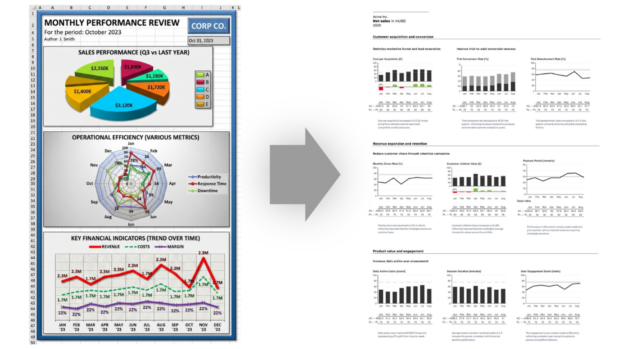
Open ten corporate reports and you’ll see ten different visual languages. Pie charts where bar charts would do. Y-axes that start halfway up the page to make a 3% trend look heroic. Red used for sales in one chart and for losses in the next. Pink used for nothing in particular. The result is reports that take longer to read than they took to write, and decisions made on the basis of half-understood pictures.
ISO 24896 is the international community’s answer to that mess. The new standard, due to be published by ISO in mid-2026 and built on more than a decade of work by the IBCS Association, sets out how charts, tables and text in business reports, presentations and dashboards should look. The aim is straightforward: the same business facts, presented by two different organisations, should produce near-identical visuals, so the reader can read the meaning rather than decode the design.
This guide explains what ISO 24896 actually requires, what it deliberately leaves alone, and what it means in practical terms for the way you build dashboards and management reports. I’ll cover the universal rules everyone should follow, the seven topic areas the standard addresses, and the easy wins you can pick up before any formal compliance review.
What ISO 24896 actually is
ISO 24896, formally titled Notation for business reporting, is being developed by ISO Technical Committee 37, the committee responsible for language and terminology standards. As of May 2026 the final text is locked and the standard is at "Proof" stage (technically ISO/PRF 24896), with publication expected within months. By the time you read this it may already be on the ISO catalogue under its final reference, ISO 24896:2026.
What’s striking about 24896 is what it doesn’t try to do. It isn’t a standard for what you should measure, how you should govern your KPIs, or how to design a balanced scorecard. It is purely about notation: the visual conventions used to label, lay out and represent business information once you’ve decided what to communicate. Think of it as the equivalent of music notation for business reporting. Two musicians writing the same melody in the same key produce nearly identical scores. Two finance teams reporting the same Q3 results today produce wildly different ones. ISO 24896 is the attempt to make business reporting more like music notation.
The standard has its roots in the International Business Communication Standards (IBCS), a notation framework developed by Rolf Hichert and refined by the IBCS Association over more than a decade. IBCS is sufficiently mature and widely-applied that ISO has now formalised parts of it as an international standard. Many of the IBCS Certified Consultants who shaped the original framework also sit on the ISO/TC 37 committee responsible for 24896, which is why the two documents are so closely aligned.
Requirements in the standard fall into two types. Universal requirements apply to everyone: rules so fundamental to clear communication that there is no good reason to deviate from them. Organisational requirements allow each organisation to choose its own convention, provided it then applies that convention consistently across all its reporting. The split is sensible. It standardises the things that genuinely benefit from a global convention, while leaving room for legitimate local variation in things like fonts, colours and date formats.
For a deeper look at the relationship between ISO 24896 and IBCS, see ISO 24896 vs IBCS: What’s the Difference and Why It Matters (satellite page coming next).
Why this matters now
ISO standards have a particular kind of weight. Private frameworks like IBCS are excellent, but they remain optional and relatively unknown outside specialist circles. An ISO standard is procurable. It can be referenced in tender documents. It can be required by parent companies, regulators or trading partners. And, crucially, software vendors will start advertising compliance with it, which means the BI tools you procure will increasingly default to its conventions whether you ask for them or not.
There are three practical knock-on effects worth thinking about now.
Dashboard procurement is going to change. Within twelve months of publication, expect "ISO 24896 compliant" to appear in vendor pitches. Some tools will genuinely meet the standard, many will half-meet it, and a few will tick the box without doing the work. Knowing what compliance actually requires will be the difference between buying a tool that helps your reporting and one that just claims to.
Staff training and onboarding gets simpler. Once 24896 is established, "what’s a desirable variance" or "how do we show forecasted data" stops being a per-organisation argument and becomes a shared convention people learn once and carry between roles.
AI-generated reports will normalise on it. Large language models and AI report-builders need a default visual vocabulary. ISO 24896 is the obvious candidate. Expect the next wave of AI-built dashboards to look as if they were built to this standard, whether the user asked for them or not.
If you don’t shape your reporting around it, your reporting will look out of step. Quietly, but unmistakably.
The universal rules at a glance
Some of 24896’s rules are universal: every organisation should follow them, full stop. The most consequential are these.
Always start a value axis at zero, so that the visual proportions match the underlying numbers (no more clipped y-axes that turn a 2% increase into a vertical leap). Always show variances with an explicit algebraic sign, so that "+15" means a positive variance of fifteen and "15" without a sign means an absolute value of fifteen. Always use green for variances that are good for the business target, red for variances that are bad, and blue for variances that are neutral or ambiguous, with grey alternatives for black-and-white print and a blue-green substitute for green where colour-blind accessibility matters.
Always represent actual data with a solid dark fill, planned data with an outlined frame, and forecasted data as hatched. Always arrange time chronologically, left to right, with longer periods occupying wider category widths than shorter ones. And always give visuals descriptive titles that tell you who the data is about, what is being measured, and when, with no editorial in the title (interpretations belong in a separate "key message" element, which we’ll come to).
That’s the core. Almost every other requirement in the standard is a refinement or special-case clarification of one of those principles.
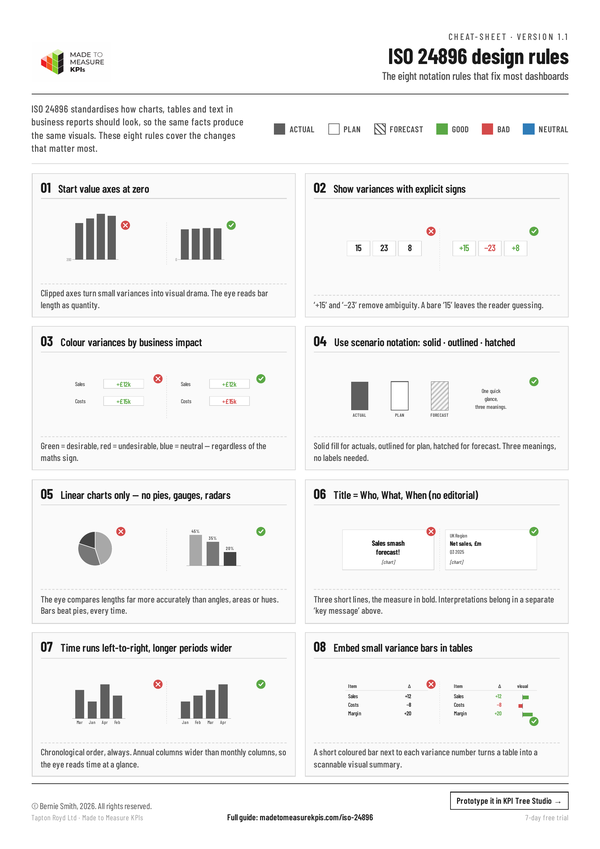
Download our free ISO 24896 cheatsheet
Descriptive text: titles, labels and legends
Most reports start to fail at the title. ISO 24896 is uncompromising about how titles work. A title identifies content, it does not interpret it. "Q3 2025 sales by region" is a title. "Q3 sales smash forecast" is not, because it contains an evaluation that should sit somewhere else on the page.
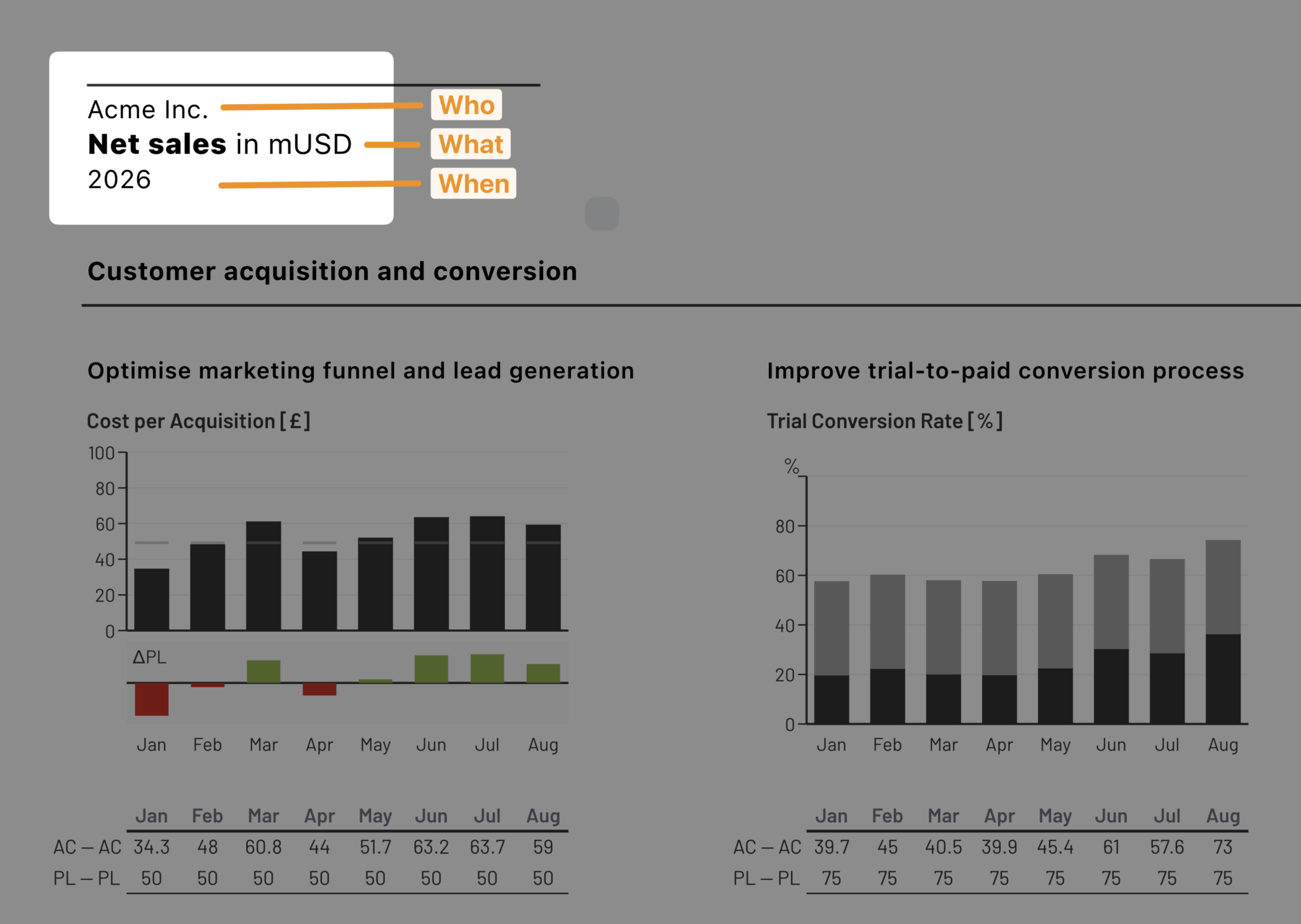
The standard requires every visual title to answer three questions: who (the reporting entity, business unit, project), what (the measure, with its units), and when (the period or date). It even suggests a layout: all three on three separate lines in the upper-left of the visual, with the business measure in bold. If you have multiple visuals on the same page or slide, the page title carries the elements they share, and each visual’s title carries only what’s specific to it. The two combine in the reader’s head to identify the visual.
Legends and category labels follow a similar discipline. Place them as close as possible to whatever they label. Write them horizontally, not on a 90-degree slant that gives the reader a stiff neck. In column charts, integrated legends sit either to the left of the leftmost column or to the right of the rightmost column, not in a separate box at the bottom that requires a back-and-forth eye trip. In bar charts, legends sit above the top bar.
Data labels (the actual numbers on the chart) get the same treatment. Place them close to whatever they label. Write them horizontally where space allows. Leave off labels for components that are too small to matter, rather than packing every column with numbers that only add visual noise. In stacked columns, label segments inside the segments and put the total above or below.
The "key message" (the one-sentence takeaway you want the reader to leave with) sits separately from the title, usually directly above it. This is a deliberate split. It keeps the title neutral, descriptive and reusable, while letting you state your interpretation clearly without confusing fact and opinion.
Charts: what type to use, and what not to do
Section 4.3 of the standard is where 24896 gets specific about chart design, and a lot of common practice doesn’t survive the encounter.
The standard limits you to linear charts: charts that compare values along a straight axis. That includes columns, bars, lines, areas, scatter and bubble. It explicitly recommends replacing any non-linear chart type (pie charts, radar charts, speedometers, funnel charts, coloured maps) with a linear equivalent, on the grounds that the human visual system is much better at comparing lengths than it is at comparing angles, areas, volumes or hues. If you have ever stared at a pie chart trying to work out whether a 23% slice is bigger or smaller than a 26% slice, you’ll understand why.
Within linear charts there are three flavours. Charts with a horizontal category axis and a vertical value axis (columns, lines, areas, with all their stacked, grouped, normalised and waterfall variations). Charts with a vertical category axis and a horizontal value axis (bars, with the same variations, plus a warning to avoid lines and areas with vertical category axes unless there’s a logical connection between the categories). And charts with two value axes (scatter and bubble charts).
Then come the rules about not lying with the chart. Always start value axes at zero. Don’t clip columns and bars (the visually-perceived size has to match the underlying number). If you genuinely need to show small changes within large values, represent only the change rather than the absolute, and label the chart accordingly. If two charts on the same page or slide use the same unit of measurement, give them the same scale, so that an eye flicking between them gets a fair comparison. If different scales are unavoidable, indicate the scale ratio visually with a "scale band" rather than letting the reader assume.
The category-width rule is a small detail with big consequences. The width of each category on the axis (one column-slot per month, say) shouldn’t depend on how much space happens to be available or how many data points there are. It should be set deliberately, with empty slots left visible for missing data, so that charts comparing the same dimension end up visually consistent across your reports.
🖼 ILLUSTRATION 4 — placeholder
Three-panel comparison. Panel A: a pie chart of regional sales (the "don't"). Panel B: the same data as a column chart with a manipulated axis starting at 200, making one region look hugely dominant (also a "don't"). Panel C: the compliant version, columns with a zero baseline and consistent category widths. Captions on each panel.
Tables: rows, columns and the case for variance bars
Most discussions of business reporting treat tables as the dull cousin of charts. ISO 24896 takes them seriously, and rightly. A surprising amount of management decision-making still happens through tables, and a poorly-designed table can mislead just as effectively as a clipped bar chart.
The standard categorises rows and columns into named types and asks you to apply consistent visual attributes to each. Typical row types include header rows, measure rows (showing different KPIs), structure rows (regions, products), "of which" rows (showing components of an aggregate without summing to it), remainder rows (lumping less-important categories together), "percent of" rows (showing a share of a given total) and totals rows. Column types include header columns, scenario columns (Actual vs Plan), variance columns, time columns, measure columns, structure columns, and equivalents of "of which" / remainder / percent of / totals.
For each type, you choose visual attributes once and apply them everywhere: row height, alignment, horizontal lines and gaps, font weight, font size. The result is that a reader who has met one of your tables can read all of them. They know that a bold row at the bottom of a section is a total, that a smaller font in a particular column means "this is a percentage of the column above it", that a thin gap between columns groups them as related.
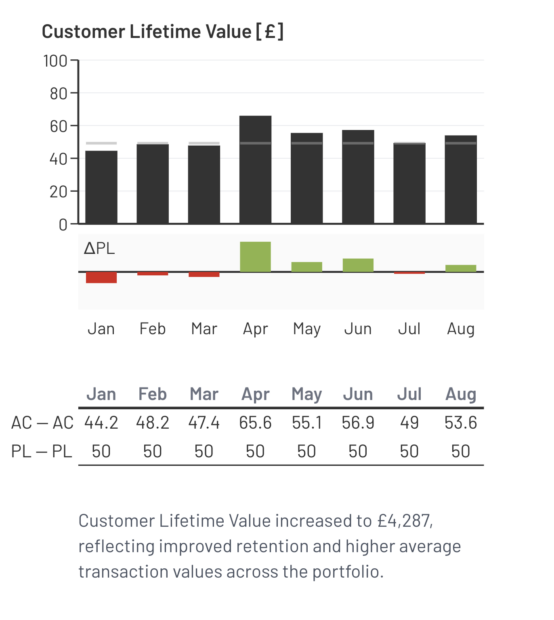
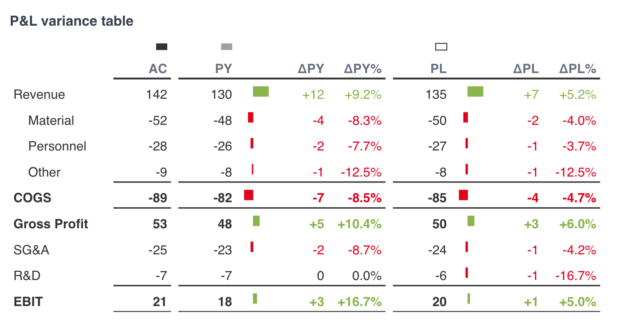
The standout requirement, though, is embedded variance bars. Where a table column shows a variance between two scenarios, 24896 asks you to add a small visual bar representing the size of the variance, scaled consistently across the table, alongside the number. The bar is coloured by impact (green / red / blue, as elsewhere), so the eye can pick out the biggest issues and the biggest wins at a glance, without having to read every row. It’s a simple addition that turns an otherwise-flat table into a scannable visual summary in its own right.
Business dimensions: measures, time periods and scenarios
This is where 24896 gets opinionated about the language of business charts.
Measures come in two flavours. Absolute measures (sales in pounds, headcount, kilograms shipped) are shown with columns or bars that occupy two-thirds of the category width. Relative measures (return on sales, sales per head, percentage growth) are shown with thinner columns or bars that occupy one-third of the category width. The width difference is deliberate. It gives a reader a visual cue, before they even look at the label, telling them whether they’re looking at an absolute number or a ratio.
Time periods are arranged left-to-right in chronological order (January at the left, December at the right; Q1 before Q4). When charts at different time granularities appear together (yearly, quarterly, monthly, weekly, daily), the longer the period the wider the category. So a chart of annual figures uses wider columns than a chart of monthly figures, and the eye instantly recognises the time scale of each.
Scenarios are the most distinctive notation in the whole standard, and worth understanding in detail because once you’ve internalised it, you’ll never look at a corporate dashboard the same way again.
There are three scenario types. Actual data (already happened, measured) is shown with a solid dark fill. Planned data (a forecast we made before the period started, like a budget or annual plan) is shown with an outlined frame and a white or very light fill, the implication being that the box will "fill up" when the actuals come in. Forecasted data (an in-flight prediction part-based on actuals that have arrived, like a sales forecast based on order entry) is shown with hatched fill, sitting between the certainty of Actual and the open-ended quality of Plan.
Once you start using these, comparing scenarios becomes much more efficient. You can put a solid grey "Actual" column overlapping an outlined "Plan" column to show plan vs actual at a glance, with the colour and fill carrying the meaning so the chart needs almost no labelling. The standard lays out specific rules for how the scenarios should be arranged (chronologically, then by creation order: Plan first, then Forecast, then Actual), which leftmost-and-rightmost ordering matches the way most readers naturally scan a chart.
Comparisons: variances, time and structure
Most reports exist to support a comparison. ISO 24896 standardises the visual conventions for the three big comparison types.
Variances between scenarios (typically AC vs PL or AC vs PY) get the most detailed treatment. Variance numbers are always written with an explicit sign. Variance visuals are coloured by impact on the business target, not by mathematical sign: a positive cost variance (costs went up) is undesirable and shown in red, even though the number is positive. The standard is careful to use the words "desirable" and "undesirable" rather than "positive" and "negative" precisely to avoid this confusion.
Absolute variances are shown as columns, bars or areas, scaled to match the base values they relate to (so the variance and the base read consistently together). The fill carries both the scenario notation (solid, outlined, hatched) and the impact colour (green, red, blue). The category axis is given a visual treatment to indicate which scenario is the reference the variance is being measured against: thicker, with a solid light fill if the reference is a previous period, outlined if the reference is a plan, hatched if the reference is a forecast.
Relative variances (percentage variances) are shown as very thin columns or bars called "pins", with a head marker that indicates the scenario type and a body that carries the impact colour. The pins are typically placed on a separate tier of the chart so that absolute and relative variances can both be read at a glance.
Time comparisons get a small notation system of their own for things that are otherwise easy to mislabel: a time span uses two full stops ("2024-01..2024-06"), a period-to-date accumulation uses an underscore ("2024-01_06" for January-to-June year-to-date), a period-to-go accumulation does the same in reverse ("2024-07_12" for the rest of the year still to come). It’s a small detail with disproportionate value: anyone reading your reports across organisations now has a shared vocabulary for what a label like "_2024-06" actually means.
Structure comparisons (across regions, products, customer segments) ask for the same discipline: clearly-labelled averages, ranking indicated with an arrow on the sort criterion (e.g. "order by sales ↑"), indexed comparisons marked with a black "100%" arrow at the reference category, normalised stacked charts indicated with a 100% line.
Highlighting markers: emphasising the things that matter
The final section of the standard covers the small visual flourishes that make a report point at its own conclusions. Three markers in particular.
Difference markers are the brackets-and-bars notation used to show "this is the gap between these two values". The length of the marker matches the size of the gap. The colour signals whether the gap is desirable, undesirable or neutral. An optional arrowhead can indicate whether the gap represents an increase or a decrease.
Trend arrows are sloped arrows laid across a time series to show the average growth rate over a period. The slope of the arrow matches the actual rate. The colour, again, indicates impact on the business target, so a strongly-rising line of declining customer satisfaction is correctly drawn as a steep red arrow, even though the number is going up.
Markers on individual values and labels are a catch-all for the things you want to draw the reader’s eye to: a circle around an outlier, a callout to a specific data point, a highlighter behind a key label. The standard’s only requirement is consistency: design these once, then use the same design for the same purpose throughout your reporting.
The principle running through all three is the same: highlighting markers are a deliberate emphasis tool, not visual decoration. If a marker doesn’t point at something a reader needs to notice, it shouldn’t be there.
What ISO 24896 doesn’t cover
It’s worth being explicit about the scope of the standard, because the scope is narrow on purpose.
24896 doesn’t tell you which KPIs to choose. It doesn’t tell you how to design a balanced scorecard. It doesn’t tell you how to write a commentary, run a performance review, or govern a measurement system. It says nothing about whether your organisation should be using lagging or leading indicators, whether your KPIs are SMART, or whether they’re driving the right behaviours.
The standard explicitly inherits some of that broader work from elsewhere. It builds on ISO 24495-1 (plain language). It points at WCAG 2.2 and ISO/IEC 23859:2023 for accessibility. It expects organisations to apply other ISO standards for currencies (ISO 4217), dates (ISO 8601-1) and units (ISO 80000-1). 24896 sits on top of those as the layer that says: now that you’ve decided what to communicate, here’s what it should look like.
In practical terms, that means an organisation can be 100% ISO 24896 compliant and still be measuring the wrong things or governing them badly. Compliance with the visual standard is necessary but not sufficient for clear management reporting. The harder work is upstream: choosing the right KPIs, defining them properly, and embedding them in the way you run the business. The standard makes that work more useful by making sure the resulting reports actually communicate, but it doesn’t replace it.
What this means for your dashboards now
If you build, commission or consume management dashboards and reports, here’s what you can usefully do today, before formal publication and well before any compliance push.
Audit one dashboard against the universal rules from earlier in this article. Pick a single dashboard you look at often. For each chart, check: does the y-axis start at zero? Are scales consistent across charts that use the same unit? Are variances signed and coloured by impact rather than by sign? Is actual data visually distinct from planned and forecasted? Is the title descriptive (Who/What/When) or editorial? You’ll typically find five to ten quick wins on the first dashboard alone.
Adopt the scenario notation across your reporting templates. Solid for actuals, outlined for plans, hatched for forecasts. It’s the single change with the biggest readability payoff, and it costs almost nothing to implement once.
Standardise your variance colours and signs. Decide once that green is desirable, red is undesirable, and blue is neutral, and apply it everywhere. Add explicit plus-signs to positive variances. The first time someone reads a "+15" without having to think about whether the number is good or bad news, you’ll know the change is working.
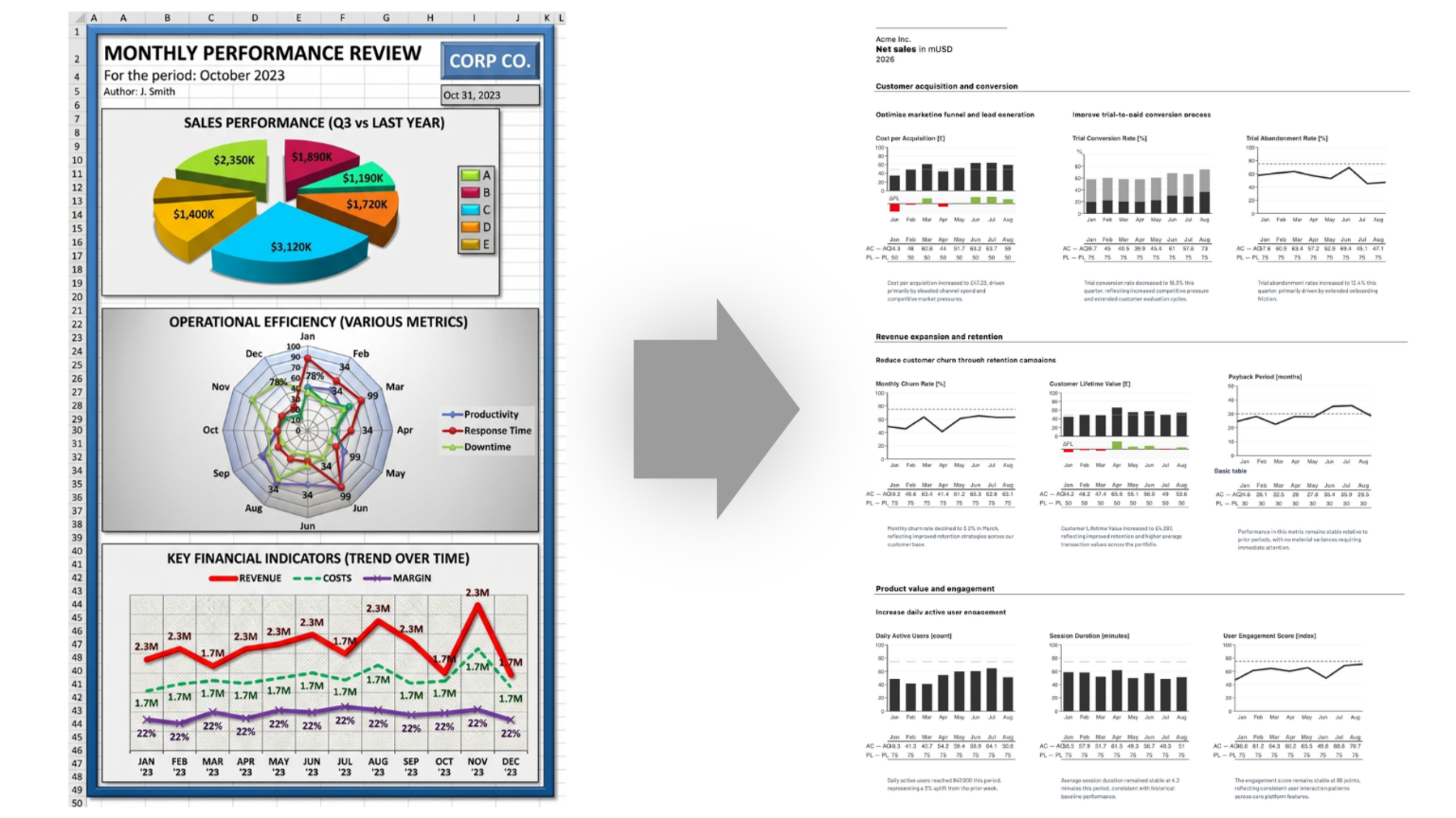
Stop building things 24896 will retire. Pie charts, gauge speedometers, radar charts, 3D anything. They aren’t compliant, and they weren’t really helping anyway. Replace them with linear equivalents on the next dashboard refresh.
Add a "key message" to your most-read reports. One sentence, at the top of the page, summarising what the reader should take away. Your first attempt will be uncomfortable: it forces you to actually decide what the report is saying, rather than just presenting data. That discomfort is the point.
Build your first ISO 24896-compliant dashboard
The fastest way to internalise a notation standard isn’t to read it, it’s to build something with it. KPI Tree Studio gives you an environment to draft ISO 24896-compliant dashboards and report wireframes from scratch, with the colour, scenario, variance and chart-type rules already baked into the templates. You can prototype an entire reporting suite, share it with stakeholders for feedback, and iterate on the visual language before any of it gets near a production BI tool.
If you want to try it on a live problem of your own, the prototyping workspace below has a 7-day free trial. Bring one of your existing dashboards along. By the end of the trial, you’ll either have a much better-looking version of it, or you’ll have proved to yourself which of your current charts genuinely earn their place.

Further reading
- The standard itself: ISO/PRF 24896 Notation for business reporting on the ISO catalogue
- The framework it’s based on: International Business Communication Standards (IBCS Association)
- Compliant chart and table examples: the IBCS template library at ibcs.com/iso24896/templates
Frequently asked questions
What is ISO 24896?
ISO 24896 is an international standard for the visual notation used in business reports, presentations and dashboards. It standardises how charts, tables and text should look so the same business facts produce consistent visuals across organisations.
When will ISO 24896 be published?
The standard is currently at "Proof" stage (ISO/PRF 24896) following a successful Draft International Standard ballot in January 2026. Final publication as ISO 24896:2026 is expected in mid-2026.
Is ISO 24896 the same as IBCS?
ISO 24896 is closely based on the International Business Communication Standards (IBCS) developed by the IBCS Association, but they’re not identical. ISO 24896 formalises a defined subset of IBCS as an international standard. IBCS itself remains a more comprehensive framework, including elements (like report storyboarding) that ISO 24896 deliberately leaves out.
Does ISO 24896 tell me which KPIs to use?
No. ISO 24896 is a notation standard. It says how to visually present business information once you’ve chosen what to communicate. It doesn’t say what to measure, how to govern KPIs, or how to design a scorecard.
What’s the easiest place to start with ISO 24896 compliance?
Three quick wins on any existing dashboard: (1) start every value axis at zero, (2) add explicit + and − signs to all variances, (3) use green for desirable variances, red for undesirable, blue for neutral, regardless of the mathematical sign of the number itself.
This article will be updated when ISO 24896 is formally published.